

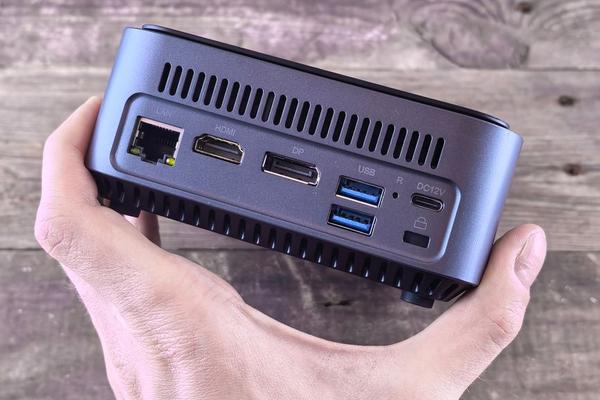
Mini PCs have moved well beyond the “good enough” category. For a space-limited home office in 2026, a compact desktop can deliver the responsiveness, monitor support, fast networking, and quiet operation that once required a much larger tower. The best mini PC for home office use is less about finding the tiniest box and more about choosing the right balance of processor, memory, storage, ports, and upgradeability.
For most office users, 16GB of RAM is the sensible starting point, while 32GB is better for heavy multitasking, large spreadsheets, development tools, or creative apps. A 512GB SSD works, but 1TB gives a primary work machine more breathing room. Good connectivity also matters because a mini desktop computer still needs to handle monitors, storage, Ethernet, webcams, and other desk accessories.
Best Windows all-rounder: ASUS NUC 15 Pro
The ASUS NUC 15 Pro is one of the most complete Windows choices. It is available with Intel Core and Core Ultra processors, including Core Ultra 5 and Core Ultra 7 options, and supports two replaceable memory modules. That makes it a strong small form factor PC for someone who wants capable performance now with room to upgrade later.
Current configurations offer two HDMI outputs, two Thunderbolt 4 ports, 2.5Gb Ethernet, front USB-C, and several USB-A ports. That mix works well with dual monitors, fast external storage, wired networking, and older peripherals. For a permanent Windows desk, it is the most balanced pick here.
Best for Mac users: Apple Mac mini with M4
Apple’s M4 Mac mini remains an easy recommendation for people already working in macOS. The standard M4 model is only about five inches square, yet it supports up to three displays and includes three rear Thunderbolt 4 ports, HDMI, Gigabit Ethernet, two front USB-C ports, Wi-Fi 6E, and Bluetooth 5.3. It is quiet and powerful enough for office work, coding, photo editing, and many video tasks.
The main limitation is upgradeability. Memory and internal storage cannot be replaced later, so buying enough at the start matters. If macOS is central to your workflow, though, the Mac mini combines desktop performance with an exceptionally small footprint.
Best business-focused pick: Lenovo ThinkCentre M75q Gen 5 Tiny
The ThinkCentre M75q Gen 5 Tiny feels like a corporate desktop shrunk to one-liter size. Lenovo offers AMD Ryzen and Ryzen PRO 8000-series processors, integrated Radeon graphics, up to 32GB of DDR5 memory, and up to 2TB of M.2 PCIe storage. Ryzen PRO configurations are especially relevant for buyers who value business-oriented management and security features.
It also has the practical connections office users expect, including USB-A, USB-C, DisplayPort, HDMI, and Ethernet, with optional expansion choices on some configurations. That makes it a strong compact PC for office use with two monitors, a wired network, webcam, headset, and backup drive.
Best value and upgradeability: GMKtec NucBox M6 Ultra
The GMKtec NucBox M6 Ultra stands out when value and internal flexibility matter. It uses AMD’s Ryzen 5 7640HS with Radeon 760M graphics, supports two DDR5 memory modules, and provides two M.2 storage slots. USB4, HDMI, DisplayPort, Wi-Fi 6E, Bluetooth, and dual 2.5Gb Ethernet also make it unusually flexible for its size.
That combination suits users who work with a NAS, need several displays, or want fast local networking. It is not a replacement for a workstation with dedicated graphics, but for productivity, light content creation, and technical work, it offers plenty of capability.
Best straightforward budget pick: GEEKOM A5
The GEEKOM A5 remains a sensible lower-cost choice for everyday work. Recent configurations pair an AMD Ryzen 5 7430U with 16GB of memory and a 1TB NVMe SSD, plus dual HDMI, 2.5Gb Ethernet, Wi-Fi 6, Bluetooth, and an SD card reader. Memory and storage are upgradeable.
It lacks USB4 and Thunderbolt, so it is better suited to a conventional desk than a high-end single-cable docking setup. For documents, research, accounting software, email, video calls, and dual-monitor productivity, it covers the essentials without charging for power many users will never need.
How to choose the right mini PC for your home office
Start with memory, not processor branding
Modern midrange processors are already fast enough for most office tasks. Choose 16GB for normal productivity and 32GB if you routinely keep many browser tabs open alongside Zoom or Teams, large spreadsheets, design software, coding tools, or virtual machines.
Count your ports before you buy
Write down every connection you use: monitor outputs, USB-A devices, USB-C accessories, Ethernet, audio, and external storage. If you run two 4K monitors, verify the exact display combination supported by the configuration rather than assuming every USB-C port carries video.
Decide how much upgradeability matters
If you keep computers for five years or more, replaceable RAM and extra M.2 storage slots can be valuable. This is one reason the ASUS, Lenovo, GMKtec, and GEEKOM systems appeal to users who want a compact desktop without giving up serviceability.
A practical home-office setup
Imagine a two-monitor desk used for Chrome, Slack, Zoom, Excel, cloud accounting, a password manager, and occasional photo editing. A 16GB mini PC with a 1TB SSD will usually feel quick, but 32GB provides more headroom when many tabs and desktop apps stay open all day. Mounting the computer behind a VESA-compatible monitor can free even more desk space.
Useful related topics for further reading include home office monitor buying guide, how much RAM you need for office work, and USB-C docking station guide.
Frequently asked questions
Is a mini PC powerful enough for working from home?
Yes. A mini PC with a modern midrange processor and at least 16GB of RAM can comfortably handle office applications, web tools, video meetings, multiple displays, and general multitasking. Heavy 3D work or sustained professional rendering may still justify a larger system with dedicated graphics.
Is 16GB of RAM enough for a home office mini PC in 2026?
For most people, yes. It is a practical minimum for a new work computer. Choose 32GB if your workload involves large data files, development environments, creative software, virtual machines, or especially heavy browser use.
Can a mini PC run two monitors?
Most current models can run at least two displays, but supported resolutions and refresh rates vary. Check the exact HDMI, DisplayPort, USB-C, or Thunderbolt specifications for the model and processor configuration you plan to buy.
Are mini PCs better than laptops for a permanent desk?
They often are when portability is not required. A mini PC can provide more ports, easier upgrades, quieter cooling, and better value when you already own a monitor, keyboard, and mouse. A laptop is still better if you regularly work away from the desk.
Which mini PC is the best choice?
For most Windows home offices, the ASUS NUC 15 Pro offers the best balance of performance, ports, and upgradeability. The M4 Mac mini is the clear choice for macOS users, while Lenovo’s ThinkCentre M75q Gen 5 Tiny suits a business-first setup. The GMKtec M6 Ultra is compelling for value and expansion, and the GEEKOM A5 covers everyday productivity on a tighter budget. Match the machine to your monitor setup, memory needs, and peripherals, and a mini PC can replace a full-size tower without making your workspace feel compromised.