

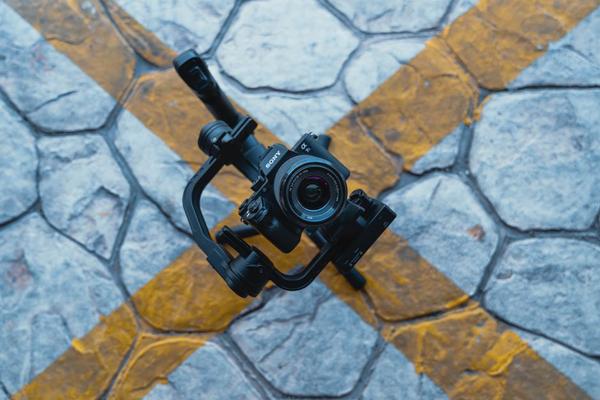
A walking shot can look beautifully steady with either a motorized camera gimbal or a mechanical stabilizer. The difference becomes obvious when you turn a corner, change lenses, or keep filming after a long day. One system actively controls camera orientation; the other relies on balance, inertia, and the operator’s touch.
In a camera gimbal vs stabilizer comparison, terminology matters: a gimbal is itself a type of stabilizer. In everyday video discussions, however, “gimbal” usually means a motorized unit and “stabilizer” often means a non-motorized, counterweighted rig. Understanding that distinction makes the buying decision much clearer.
How each system keeps a shot steady
Motorized camera gimbal
The practical camera gimbal meaning is a support that uses sensors and motors to counter unwanted rotation. A typical 3 axis gimbal manages pan, tilt, and roll. It can keep the camera facing one direction or follow your hand movements at a chosen speed.
Motors do not replace balancing. You still position the camera on its mounting plate and balance the axes before switching it on. The electronics then handle rotational corrections and controlled moves within their operating range.
Mechanical handheld stabilizer
A traditional handheld stabilizer uses a pivoting handle, a post, and adjustable counterweights or other passive components. The camera’s mass and the rig’s inertia resist sudden directional changes. Your hand guides the camera instead of commanding motors.
Some mechanical rigs contain a freely moving gimbal joint, so the terms overlap technically. The meaningful difference here is active electronic correction versus passive stabilization.
Movement control: repeatability versus physical feel
A motorized gimbal excels when a shot must be repeatable. Follow settings determine how quickly it pans or tilts, while lock modes maintain a selected direction. Depending on the model, a joystick or remote operator can control framing separately from the person carrying the camera.
Mechanical stabilizers feel more direct. Gentle fingertip pressure can create an elegant turn, but consistent framing depends on skill. They can produce flowing tracking shots; they cannot automatically execute a programmed pan at a selected speed.
Neither tool eliminates vertical bounce from footsteps. Both require controlled movement, particularly with longer focal lengths.
Setup and balancing
With a motorized gimbal, mount the camera, check arm clearance, balance the axes, and perform any recommended motor calibration. Changing to a heavier lens or adding accessories may require rebalancing. Once configured, switching between supported follow modes is straightforward.
On a mechanical rig, adjust counterweights and the post for suitable static and dynamic balance. This takes patience when learning how the system behaves. No motor tuning follows, but poor balance can cause drifting or swinging.
Rehearse the actual shot before recording. A setup that appears balanced while stationary may reveal unwanted sway during a turn.
Payload and camera compatibility
Consider the complete camera setup: body, lens, cage, filter, microphone, and accessories. Check the manufacturer’s weight limits and physical clearance. A camera may sit below a gimbal’s stated payload yet be difficult to balance because of its shape or an extended lens.
Mechanical stabilizers have supported weight ranges too. Counterweights improve balance but add carrying weight. Zooming an extending lens can shift the center of gravity on either system.
When comparing video stabilization gear, camera-and-lens dimensions matter nearly as much as the advertised payload rating.
Power and reliability on long shoots
Motorized gimbals need charged batteries for active stabilization. That means monitoring runtime and, on some models, dealing with apps or firmware. Incorrect balancing or unsuitable motor settings can also cause vibration.
A purely mechanical stabilizer needs no electricity to perform its stabilizing function. That is valuable on remote shoots. Its moving parts still require care, and its operator supplies all directional control.
Learning curve and fatigue
Motor assistance often makes an early usable walking shot easier. But reliable gimbal work still requires learning follow modes, avoiding unwanted horizon changes, and walking smoothly. Mechanical systems generally demand more practice to master steering and prevent pendulum-like swings.
Consider fatigue as well. Even a compact gimbal becomes tiring when held away from the body. A counterweighted rig can be heavy; larger professional systems may use support arms and vests. Compare complete setups rather than bare product weights.
Which shots suit each option?
For property tours, product walkarounds, repeatable reveal shots, and solo creator work, a motorized gimbal usually provides more convenient framing control. Predictable pans are especially useful when moving around a subject.
For extended documentary-style movement or locations without charging access, a mechanical stabilizer can be compelling in practiced hands. Its movement has a distinctive physical feel, though neither system is automatically more cinematic.
Imagine filming a wedding entrance while walking backward. A gimbal in the right follow mode helps keep the couple framed as you turn into an aisle. A mechanical rig can create the same graceful move, but the operator must manually steer each turn. Rehearse the route, use a spotter when moving backward, and keep your steps controlled.
A practical buying test
Start with the shots you actually repeat. Choose motorized support when controlled rotations, solo operation, or programmable movement matter. Consider a mechanical model if you prefer hands-on operation, want independence from batteries, and can invest practice time.
Try your own camera and lens on the equipment before buying or renting, where possible. Walk, stop, turn, and attempt a low-angle shot. Check clearance, balancing effort, working weight, and how the movement looks. In-body or optical stabilization may reduce smaller vibrations but does not reproduce the same operating experience.
Frequently asked questions
Is a gimbal better than a stabilizer?
Not universally. A motorized gimbal makes controlled and repeatable camera orientation easier, while a mechanical stabilizer rewards skilled manual operation and does not require power for stabilization.
Does a 3 axis gimbal remove all camera shake?
No. It primarily corrects unwanted pan, tilt, and roll rotation. Footstep bounce, vertical movement, and poor technique can still appear in footage.
Can a handheld stabilizer support a heavy DSLR?
Possibly, if the complete camera-and-lens setup falls within its supported range and balances correctly. Consider carrying comfort as well as specifications.
Do mechanical stabilizers work without batteries?
Passive counterweighted stabilizers do. Mounted accessories, such as monitors or wireless transmitters, may still need separate power.
The takeaway
The camera gimbal vs stabilizer decision comes down to control and working conditions. Choose a motorized gimbal for electronic assistance and consistent framing. Choose a mechanical stabilizer for direct physical steering and power-free stabilization. Both reward careful balancing, practice, and thoughtful camera movement.